1. Introduction to RJ45 Ethernet Port
The RJ45 port, commonly‑known as a wired network port, enables 100‑Mbps/Gigabit wired network connection via Cat5e/Cat6 network cables. It provides a stable wired communication solution, different from Wi‑Fi wireless connection.
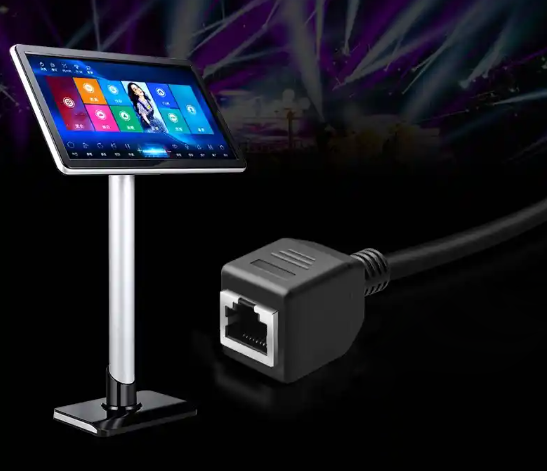
2. Core Application Scenarios of RJ45 Port on Karaoke Players
2.1 Online Music Library Update & Download (Primary Function)
Connected to a local area network or broadband, the karaoke player accesses cloud servers to batch‑download new songs, hit tracks, accompaniment audio and high‑definition MV videos. Compared with Wi‑Fi, a wired connection features low packet loss and stable speed. It avoids download interruptions and stutters for large‑capacity high‑definition songs, and is ideal for commercial KTV venues to update music libraries in bulk.
2.2 LAN Sharing (Room‑Server Networking)
Mainly applied to commercial KTV systems:
Host‑server & multi‑room client mode: One song server stores the complete music library. Karaoke terminals in each room fetch video files from the server over LAN through RJ45 cables, without storing all media files locally to save hard‑disk storage of karaoke players.
Data synchronization, parameter distribution and playlist push between karaoke terminals in different rooms.
2.3 Background Administration & Remote Control
Operators can connect a computer to the same local‑area network and access the web management panel of karaoke devices to edit playlists, configure billing settings, control power‑on/off, troubleshoot faults and upgrade firmware. Commercial KTV operators can realize centralized management of all booth devices via wired LAN, instead of manual operations on each terminal.
2.4 Internet‑based Online Services
Loading online original/vocal‑removed audio, cloud trending playlists, hit‑song rankings and short‑video background materials;
Network‑activated software authorization, membership verification and copyright library validation.
2.5 Screen Casting & Multi‑device Interaction
New‑generation karaoke players support wired‑LAN screen casting. Users can scan QR‑codes on mobile phones or tablets to queue songs and push images or videos. Data transmitted over wired LAN achieves lower latency than Wi‑Fi.
2.6 Wired Printing & Peripheral Expansion (Rare Application)
A small number of commercial systems connect receipt printers over LAN. After song orders are submitted on the karaoke terminal, receipts can be printed via the wired network.
3. Advantages and Disadvantages: RJ45 Wired Network vs. Wi‑Fi for Karaoke Systems
✅ Advantages of Wired RJ45 Connection
High stability: Resistant to signal attenuation from walls, Bluetooth and other wireless interference. Hardly disconnected when multiple devices run simultaneously in booths; the top‑choice solution for commercial KTVs.
High bandwidth: Delivers faster transmission speed for 4K and high‑definition MV files.
Low latency: Faster response for song‑selection and track‑switching commands.
Better security: Wired‑cable‑based internal network prevents unauthorized devices from accessing the karaoke system.
❌ Disadvantages
Pre‑laid network cables are required. Renovation construction is troublesome for existing KTV booths. Wi‑Fi is preferred for home karaoke players, while RJ45 wired connection is recommended for commercial venues.
4. Wiring & Precautions
Plug one end of the Ethernet cable into the RJ45 port of the karaoke player, and the other end into a router or network switch.
Gigabit switches and Cat6 cables are recommended for commercial KTV networking to ensure smooth playback of high‑definition MVs across multiple booths without stuttering.
The RJ45 port only serves as a network channel. It cannot transmit audio‑video signals directly to TVs or power amplifiers (HDMI or AV ports are required for audio‑video transmission).